Mar 26 • Jordan Felber
How to Start a Landscape Design Project in AutoCAD
Related — AutoCAD for Landscape Design course

Starting a landscape design project in AutoCAD is less about drawing and more about how you begin. The first file you set up becomes the foundation for everything that follows: layout decisions, planting plans, construction details, and ultimately whether a design can be clearly communicated and built.
Most beginners approach AutoCAD by jumping straight into drafting. The result is often a disorganized file, incorrect scaling, or a workflow that becomes difficult to manage as the project develops. In practice, landscape designers begin with a clear base drawing that reflects real site conditions, then build the design from that structure.
This article outlines the four primary ways to start a landscape project in AutoCAD and how each method shapes your workflow moving forward.
Most beginners approach AutoCAD by jumping straight into drafting. The result is often a disorganized file, incorrect scaling, or a workflow that becomes difficult to manage as the project develops. In practice, landscape designers begin with a clear base drawing that reflects real site conditions, then build the design from that structure.
This article outlines the four primary ways to start a landscape project in AutoCAD and how each method shapes your workflow moving forward.
Why Starting Your AutoCAD File Correctly Matters
Every AutoCAD project is built on its base file. If that starting point is inaccurate or loosely constructed, the effects compound quickly. Dimensions become unreliable, layouts feel disconnected from the site, and revisions require more effort than necessary.
A properly set up file allows you to work with clarity from the beginning. Scale is consistent, layers are organized, and geometry reflects real-world conditions. This creates a stable framework where design decisions can develop with confidence rather than constant correction. More importantly, it allows your attention to shift away from troubleshooting and toward designing spaces that function and feel intentional.
The 4 Primary Ways to Start a Landscape Project in AutoCAD
Most landscape projects begin from one of four starting conditions. The method you use depends entirely on what information is available at the outset.
1. Starting with On-Site Measurements
Starting from on-site measurements is the most direct way to build a landscape drawing. It places you physically within the site, translating real dimensions into a digital framework. This method is often used when no formal survey exists, or when working on smaller residential projects where speed and access outweigh the need for highly detailed documentation. While it requires more effort upfront, it builds a strong understanding of the site’s geometry and relationships.
When this method is used
- No survey is available
- Small residential projects
- Design-build or freelance workflows
What you need
- Tape measure or laser measure
- Field sketches or notes
- Key reference dimensions
How it works in AutoCAD
- Set units and scale
- Draft base geometry manually
Advantages
- Full control over the drawing
- No dependency on external files
Limitations
- Time-intensive
- Potential for measurement error
Empty space, drag to resize
2. Starting with a Rasterized Survey (PDF or Image)
Working from a rasterized survey is one of the most common entry points into AutoCAD for landscape designers. In this scenario, the site information exists as a static file, typically a scanned PDF or image, which must be interpreted and rebuilt into usable geometry. This method bridges analog documentation and digital drafting, requiring careful scaling and tracing. It introduces a structured workflow while still relying on visual reference rather than editable data.
When this method is used
- A scanned survey is provided
- No CAD file is available
What you need
- PDF or image of the survey
How it works in AutoCAD
- Attach PDF underlay
- Scale using a known dimension
- Trace key elements
Advantages
- Faster than manual measurement
- Provides reliable reference
Limitations
- Accuracy depends on scaling
Empty space, drag to resize
3. Starting with a Vectorized Survey (PDF with Importable Linework)
A vectorized survey in PDF format offers a precise starting point while remaining more accessible than a native CAD file. Unlike a scanned image, this type of PDF is exported from CAD software, meaning the linework is still embedded as vector data. AutoCAD can recognize and convert this linework into editable geometry, allowing you to bypass manual tracing and begin with a structured base that closely reflects the original survey.
When this method is used
- A survey is provided as a PDF exported from CAD
- Linework is embedded and can be imported into AutoCAD
What you need
- Vector-based PDF file
How it works in AutoCAD
- Import the PDF
- Convert recognized linework into editable geometry
- Clean and organize resulting layers
Advantages
- Maintains accuracy from original CAD file
- Eliminates need for manual tracing
- Faster transition into a usable base plan
Limitations
- Imported linework may require cleanup
- Layer structure is often lost or simplified
- Requires understanding of how to manage converted geometry
Empty space, drag to resize
4. Starting with a Civil Engineer’s File
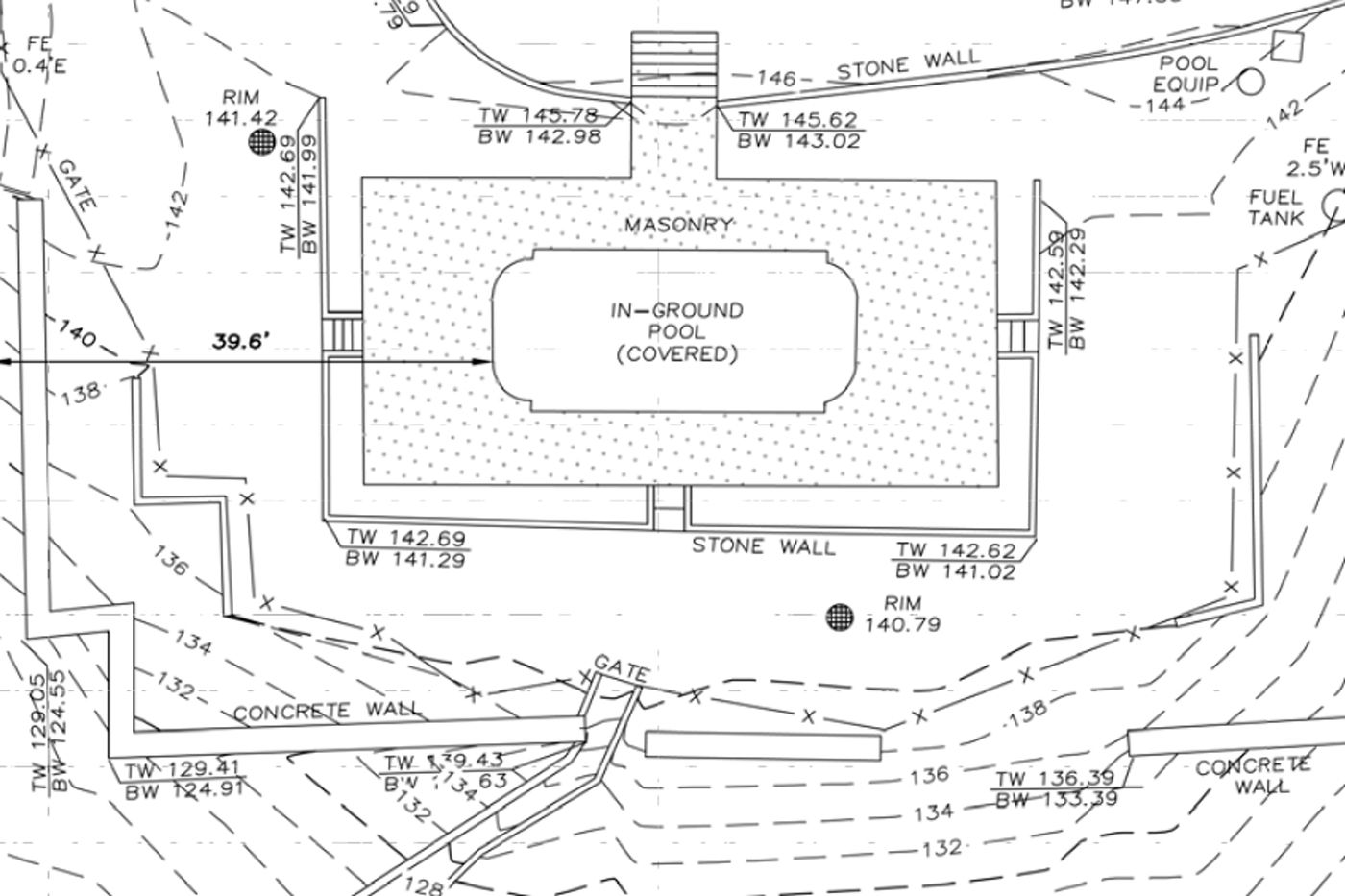
Civil engineering files introduce a broader layer of site information, often including grading, drainage, and utilities. These drawings are typically more complex and are used in projects where technical coordination is required. Rather than modifying the file directly, designers reference it into their own drawing, using it as a base for decision-making. This approach allows landscape design to align with infrastructure while maintaining control over the design layer.
When this method is used
- Projects involve grading or drainage
- Permitting or coordination is required
What you need
- Civil engineering DWG file
How it works in AutoCAD
- Attach as reference
- Isolate relevant layers
- Build design on top
Advantages
- Comprehensive site data
- Supports coordination
Limitations
- Complex and dense files
- Requires filtering

How to Choose the Right Starting Method
Choosing the right method depends entirely on the information available at the start of a project. When no documentation exists, measurement becomes the foundation. When a survey is provided as a PDF, the workflow shifts toward scaling and tracing. When a CAD file is available, the focus becomes organization and preparation. Civil files introduce another layer, where design must respond to technical constraints already defined.
Over time, designers develop fluency across all of these approaches. The goal is not to rely on a single method, but to recognize which workflow aligns with the conditions of each project and move forward with clarity.
Common Mistakes When Starting in AutoCAD
Many of the issues designers encounter later in a project can be traced back to how the file was set up. Small oversights at the beginning tend to expand as the drawing becomes more complex.
Working without confirming scale, drawing without a reference, or ignoring layer organization creates friction that compounds over time. Imported files can also introduce errors if they are not reviewed carefully. Taking the time to establish a clean and accurate base drawing reduces the need for correction and allows the design process to move forward with consistency.
What Happens After You Set Up Your Base Drawing
Once the base drawing is established, the project begins to take shape. This is where layout decisions emerge, circulation paths are defined, and relationships between spaces start to develop. Hardscape elements are introduced, planting areas are organized, and the drawing begins to communicate intent rather than just information.
For many designers, this transition is where uncertainty appears. The technical setup is complete, but the process of building a full drawing set is less defined. Understanding how to move from a base plan into a resolved design is what turns AutoCAD from a drafting tool into a design system.
Learning AutoCAD for Landscape Design Without Guesswork
Learning AutoCAD through scattered tutorials often leads to a fragmented understanding of the process. Individual commands may become familiar, but the sequence of how a project comes together remains unclear.
A structured workflow changes this entirely. Instead of approaching each step in isolation, the process becomes continuous, moving from base file setup into layout, planting, and final documentation. This is where most designers begin to see real progress, as the software becomes a tool for thinking through design rather than just drawing.
If your goal is to move from setting up files to producing complete landscape plans within a clear system, the next step is learning a workflow built specifically for landscape design.
A structured workflow changes this entirely. Instead of approaching each step in isolation, the process becomes continuous, moving from base file setup into layout, planting, and final documentation. This is where most designers begin to see real progress, as the software becomes a tool for thinking through design rather than just drawing.
If your goal is to move from setting up files to producing complete landscape plans within a clear system, the next step is learning a workflow built specifically for landscape design.
FAQs on How to Start a Landscape Dseign Project in AutoCAD
What is the best way to start a landscape design in AutoCAD?
The best way to start a landscape design in AutoCAD is to begin with an accurate base plan using the most reliable site data available. This typically means working from a survey, either as a PDF or CAD file, or building the plan from on-site measurements if no survey exists. The goal is to establish correct scale, property lines, and existing conditions before starting any design work.
Can I use AutoCAD without a survey?
Yes, you can use AutoCAD without a survey by creating a base plan from on-site measurements. Designers often measure key elements such as the house footprint, property edges, and existing features, then draft them accurately in AutoCAD. While this method works well for smaller projects, accuracy depends on the quality of your measurements and documentation.
How do you scale a PDF in AutoCAD?
To scale a PDF in AutoCAD, you use a known real-world dimension within the drawing, such as a property line or building width, and apply the SCALE command to match that measurement. Once scaled correctly, the PDF can be used as a reference to trace or extract linework for a properly sized base plan.
What file type should I ask for from a surveyor?
You should ask for a DWG file from a surveyor whenever possible. A DWG file contains editable vector linework that can be used directly in AutoCAD, making it the most efficient and accurate starting point. If a DWG is not available, a vector-based PDF is the next best option because AutoCAD can still recognize and convert the embedded linework.
Do I need AutoCAD experience before starting a project?
No, you do not need prior AutoCAD experience to start a landscape design project. However, beginners benefit significantly from following a structured workflow that shows how to move from a base plan to a complete drawing set. Without a clear process, most people rely on trial and error, which slows progress.
The Landscape Library Academy is an online platform teaching landscape professionals, students, homeowners and enthusiasts how to design landscapes and master software for the field.
The Landscape Library Academy is the education division of The Landscape Library.
Click here to visit TheLandscapeLibrary.com for media including education articles, projects features and more.
The Landscape Library Academy is the education division of The Landscape Library.
Click here to visit TheLandscapeLibrary.com for media including education articles, projects features and more.
Copyright © 2025