Jun 16 • Jordan Felber

Do You Need to Know AutoCAD Before Learning Land F/X?

Related — AutoCAD for Landscape Design

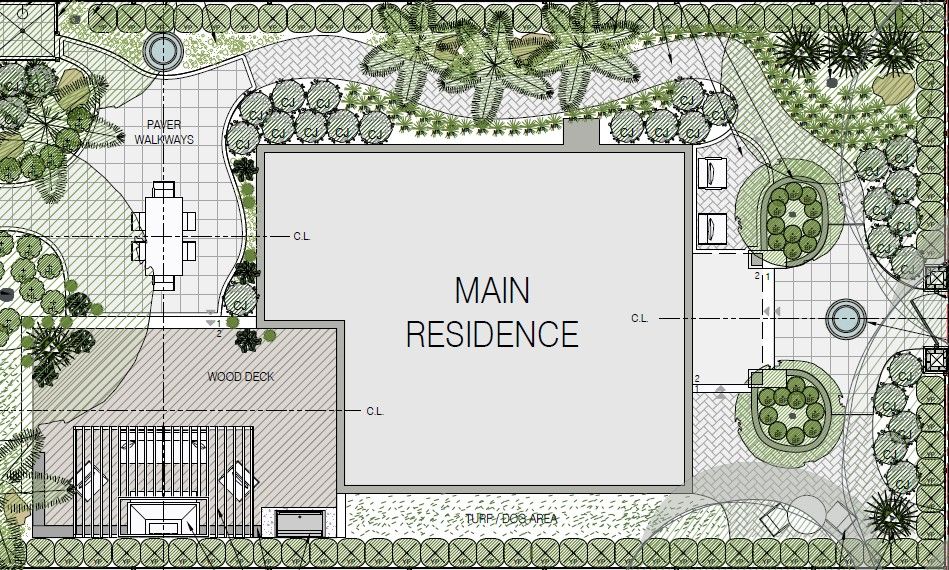
colored landscape design created in autocad
Landscape professionals researching design software often discover Land F/X while searching for better ways to create planting plans, irrigation plans, and construction documents. The software is widely used throughout the landscape architecture industry and is often presented as a powerful solution for streamlining production.

One of the first questions that follows is whether AutoCAD needs to be learned first.

The answer is yes, but not because AutoCAD is more important than Land F/X. The reason is much simpler. Land F/X is built on AutoCAD, and understanding the underlying drafting environment makes every aspect of the software easier to use.

For designers starting from scratch, the goal should not be mastering every AutoCAD command before touching Land F/X. The goal should be building a solid foundation in landscape drafting so that advanced software becomes a productivity tool rather than another obstacle to overcome.

Understanding the Relationship Between AutoCAD and Land F/X

Before choosing a learning path, it helps to understand how these two platforms work together. Many beginners assume they are competing software options when they actually serve different purposes within the design process.

AutoCAD Is the Drawing Environment

AutoCAD provides the framework where drawings are created, edited, organized, and published. Property lines, grading information, hardscape layouts, dimensions, notes, and construction details all live within an AutoCAD drawing.

Think of AutoCAD as the workspace where landscape plans are assembled. It manages the geometry, organization, and documentation that support a professional drawing set.

Land F/X Adds Landscape-Specific Functionality

Land F/X expands AutoCAD by introducing tools tailored specifically to landscape architecture and design-build workflows. Plant databases, automated schedules, irrigation tools, labeling systems, and quantity management are all integrated into the platform.

Instead of manually coordinating these elements throughout a project, designers can use Land F/X to automate much of the documentation process.

One Platform Supports the Other

Because Land F/X operates within AutoCAD, every action ultimately depends on an understanding of the underlying drawing environment. Without that foundation, even simple tasks can become frustrating.

Designers who understand how drawings are structured, organized, and plotted typically learn Land F/X much faster than those encountering drafting software for the first time.

Learn AutoCAD and Design Landscapes in Just a Few Weeks

Why AutoCAD Is Often the Best First Step

Many professionals researching software are focused on finding the fastest route to creating better plans. While it can be tempting to jump directly into specialized software, foundational drafting skills create long-term advantages regardless of which tools are added later.

Professional Drawings Begin With Organization

A successful landscape plan is more than a collection of lines and symbols. Drawings need structure, consistency, and a system that allows revisions to happen efficiently.

Learning how layers, references, dimensions, annotations, and sheet layouts work creates a framework that supports every future project.

Industry Collaboration Relies on DWG Workflows

Landscape projects rarely exist in isolation. Surveyors, architects, civil engineers, builders, and municipalities frequently exchange information through DWG files.

A working knowledge of AutoCAD makes it easier to coordinate with consultants, review project information, and participate in professional workflows that extend beyond planting design.

Strong Fundamentals Transfer to Other Software

The drafting concepts learned in AutoCAD apply to many other platforms used throughout the design industry. Understanding scale, layers, linework, documentation, and drawing organization provides skills that remain valuable regardless of future software decisions.

Rather than becoming software-specific knowledge, these concepts become professional design skills.

Learn AutoCAD and Design Landscapes in Just a Few Weeks

How Much AutoCAD Is Actually Necessary?

One of the biggest misconceptions surrounding AutoCAD is that years of experience are required before productive work can begin. While AutoCAD is a powerful platform with extensive capabilities, most landscape professionals rely on a relatively focused set of tools.

Drawing and Editing Commands

Every landscape plan begins with basic drafting. Site boundaries, patios, walkways, retaining walls, planting beds, and structures are all created through a handful of essential commands.

A strong understanding of drawing and editing tools provides the ability to build and modify plans with confidence.

Layer Management

As projects become more detailed, organization becomes increasingly important. Separating information into logical categories allows drawings to remain clear and manageable throughout the design process.

Layer management is one of the most valuable skills a landscape professional can develop because it directly affects efficiency, coordination, and document quality.

Layouts and Sheet Production

Clients do not purchase CAD files. Contractors do not build from drafting screens. The final product is a clear and professional drawing set.

Learning how to create layouts, manage viewports, establish scales, and produce PDFs bridges the gap between drafting and real-world project delivery.

Why Generic AutoCAD Training Often Falls Short

Many AutoCAD courses were created for broad audiences that include architects, engineers, manufacturers, and technical drafters. While the software principles are similar, landscape professionals often need a different learning approach.

Landscape Design Has Unique Requirements

Planting plans, hardscape plans, dimension plans, demolition plans, and construction details require workflows that differ from other disciplines. The software may be the same, but the application is different.

Learning through landscape-specific examples creates a more direct connection between the software and daily project work.

Commands Are Only Part of the Process

Many training programs focus heavily on individual commands. While technical knowledge is important, most professionals struggle with understanding how those commands fit together within an actual project.

Knowing how to draw a line is helpful. Knowing how to transform a survey into a complete landscape plan is far more valuable.

Workflow Creates Efficiency

The most productive designers are not necessarily those who know the most commands. They are often the ones who understand how to organize information, manage revisions, and produce consistent documentation.

A workflow-focused approach develops practical skills that can be applied immediately to real projects.

Learn How to Use AutoCAD to Design Full Landscapes

A Smarter Learning Path for Landscape Professionals

For those starting from the beginning, a structured progression typically produces better results than attempting to learn multiple software platforms simultaneously.

Start With Landscape Drafting Fundamentals

The first priority should be learning how professional landscape drawings are assembled. Importing surveys, establishing scale, organizing layers, creating site elements, and preparing drawing sheets create the foundation for everything that follows.

These skills remain valuable regardless of future software choices.

Learn How Complete Plan Sets Are Built

Once drafting fundamentals are in place, attention can shift toward producing the types of drawings used in professional practice. Planting plans, hardscape plans, dimension plans, and construction documents all contribute to a complete project package.

Understanding this process creates confidence and provides context for more advanced tools.

Introduce Land F/X After the Foundation Exists

At this stage, Land F/X becomes significantly easier to understand because the underlying drafting concepts are already familiar. Instead of learning two systems simultaneously, the focus can shift toward automation, scheduling, and production efficiency.

The software becomes a way to accelerate workflow rather than a substitute for learning it.

Common Mistakes When Learning Design Software

Many frustrations associated with software training stem from unrealistic expectations rather than software limitations.

Trying to Learn Everything at Once

AutoCAD, Land F/X, Rhino, SketchUp, Photoshop, rendering software, and presentation software all have value. Attempting to master them simultaneously often leads to confusion and slow progress.

Building competence one step at a time creates a much stronger foundation.

Prioritizing Software Over Process

Software is only one component of professional design work. Successful projects depend on organization, communication, documentation, and design thinking.

Focusing exclusively on software can distract from the skills that actually improve project outcomes.

Looking for Shortcuts Instead of Foundations

Many beginners search for the fastest path to professional-quality drawings. In reality, a modest investment in foundational skills often saves countless hours later.

The strongest workflows are built on understanding rather than automation alone.

The Best Way to Prepare for Land F/X

For landscape professionals considering Land F/X, the most effective preparation is learning how landscape plans are created within AutoCAD. A basic understanding of drafting, organization, and sheet production removes much of the complexity that new users often experience.

More importantly, those skills provide value whether Land F/X is adopted next month or several years from now.

That philosophy of the AutoCAD for Landscape Design course inside The Landscape Library Academy.

Rather than teaching generic drafting exercises, the course focuses on the workflows used to create professional landscape plans from start to finish. Students learn how to work with surveys, organize drawings, develop hardscape layouts, create planting plans, and produce professional documentation.

Once those skills are in place, moving into Land F/X becomes a natural next step rather than an overwhelming leap. The result is not simply a better understanding of software, but a stronger understanding of how professional landscape projects are designed, documented, and delivered.

Learn AutoCAD and Design Landscapes in Just a Few Weeks